AiOS Launcher v6.5 MOD APK (Premium Unlocked)
Additional Information from Google Play:
App Details
- Latest Version:
- 6.5
- Android Requirements
- 7.0
- Developer:
- Model X Apps
- Download the Original File on Google Play:


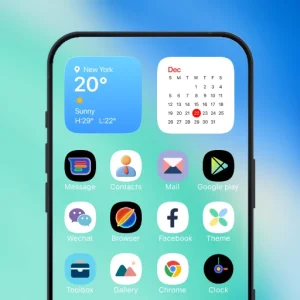
AiOS Launcher is an Android launcher app for organizing the home screen with a clean, customizable OS-style interface. It combines hundreds of themes, AI-powered icons, layout settings, gestures, and privacy tools so users can tailor their device’s appearance to their needs.
Themes and icons to change the appearance
AiOS Launcher provides more than 500 themes for changing the look and feel of the home screen. These options include Magic Icon packs created with the help of AI, giving users more variety when arranging their app icons.
Customization is not limited to selecting a theme. Colors, shapes, icon styles, fonts, app labels, grid sizes, and various other visual elements can be changed. Third-party icon packs are also supported for users who want to use icon collections from other sources.
Flexible layouts and widgets
Advanced layout settings help users arrange icons and home screen elements more precisely. The grid size can be adjusted based on the number of apps or the preferred visual style. Once the arrangement is complete, the desktop layout lock feature can be used to prevent accidental position changes.
AiOS Launcher also supports stacked widgets. Multiple widgets can be placed in one area to keep the home screen organized. Light, dark, and automatic modes are available to adapt the appearance to the device’s settings.
Gestures, shortcuts, and app search
Custom gestures allow specific actions to be performed directly from the home screen. Users can combine them with quick shortcuts to access frequently used functions without opening multiple menus. Smooth animations complement transitions between sections of the OS-style interface.
T9 app search helps users find apps through numeric and letter input patterns. This feature is useful when many apps are installed on the device. In addition, the launcher displays system storage and memory information as part of its device monitoring tools.
Control center and privacy tools
AiOS Launcher includes an advanced Control Center for more convenient access to various controls. Notification Center is also part of the interface, placing notifications and controls in a layout that matches the launcher’s style.
For managing private apps, it provides App Lock and Hide Apps. App Lock is used to lock selected apps, while Hide Apps helps conceal certain apps from view. This combination of tools provides additional control over apps that users want to restrict or exclude from the main layout.
MOD Information
Premium Unlocked means that premium features are unlocked.
The MOD version provides access to the premium features and customization options mentioned in the source, including hundreds of themes, AI-generated icons, advanced layouts, gestures, privacy tools, and available premium content. No additional technical details or other specific instructions are provided.
AiOS Launcher APK Details
| App name | AiOS Launcher |
|---|---|
| Download file version | 6.5 |
| Download file size | 33.9 MB |
| Developer | Model X Apps |
| Android requirements | 7.0 |
The app information and MOD details refer to APKMB. The download link leads to the APK file provided by APKMB.