Pixlab v3.0.2 MOD APK (Pro Unlocked)
Additional Information from Google Play:
App Details
- Latest Version:
- 3.0.2
- Android Requirements
- 7.0
- Developer:
- Photo & Video Editors - Instant Solution
- Download the Original File on Google Play:


PixLab is a photo editor and camera app for enhancing selfies, creating collages, and producing visual artwork with drip effects, stickers, filters, text, and backgrounds. One-tap features make it easy to apply effects, while the resizing tool helps adjust images for various social platforms without cropping important parts.
Creating drip effects and neon spirals
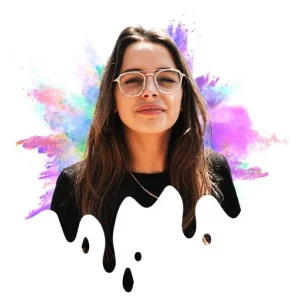
The drip effect is one of the main features of PixLab. Various drip shapes are available in different sizes and colors. After selecting a design, users can resize and reposition it to match the subject in the photo. The background color can also be adjusted for a more personalized look.
In addition to drips, PixLab provides neon spirals for decorating photos and selfies. This effect can be combined with masking unwanted areas, changing the background, or applying other effects. The selection of styles and colors allows each photo to have a different composition.
Stickers, filters, and artistic effects
The PixLab sticker collection includes cartoons, doodles, emojis, hairstyles, muscles, tattoos, and grime designs. These elements can be used to decorate photos or create memes. The sticker and emoji library also receives additions themed around special occasions such as Halloween, Valentine’s Day, and Christmas.
To change the mood of an image, animal face filters such as cats, rabbits, and dogs are available. Users can also choose light effects, photo blending, neon, glitch, sparkle, retro, or vintage effects. The retouch feature rounds out the editing options, allowing photos to be tailored to the desired style.
Collages, scrapbooks, and image adjustments
The collage maker provides more than 100 grids, various backgrounds, and frames. A single collage can contain up to 15 photos arranged in a colorful layout. Users can also start with a blank canvas and arrange images freely, then add frames and text with a variety of font options.
- Scrapbook: combines memorable photos in a visual arrangement that can be decorated.
- Blur effect: helps create a square 1:1 image while providing a DSLR-style blurred look.
- Resizer: adjusts selfie dimensions for Instagram, Snapchat, TikTok, Facebook, and WhatsApp without unnecessary cropping.
Camera, video, text, and sharing creations
PixLab handles more than just photos. The app can be used to record and edit videos, replace backgrounds, and add filters and stickers. Text is available in a range of colors and styles to complement photos, collages, or videos.
The front and rear cameras can be used when preparing collage material. Once editing is complete, creations such as selfies, images, or scrapbooks can be shared on Instagram, Facebook, WhatsApp, Snapchat, TikTok, VK, Tumblr, Flickr, Twitter, and Pinterest.
MOD Information
Pro Unlocked means the Pro features are unlocked.
The source does not provide details about which specific Pro features are included, usage limits, or any other special instructions.
PixLab APK Details
| App name | PixLab |
|---|---|
| Download file version | 3.0.2 |
| Download file size | 72.1 MB |
| Developer | Photo & Video Editors – Instant Solution |
| Android requirements | 7.0 |
The app information and file details refer to APKMB.