Power Shade v18.6.2 MOD APK (Pro Unlocked) Unlocked
Additional Information from Google Play:
App Details
- Latest Version:
- 18.6.2
- Android Requirements
- 9
- Developer:
- Zipoapps
- Download the Original File on Google Play:


Power Shade is a notification panel and quick settings customization app that helps change colors, themes, icons, backgrounds, and how notifications are displayed. The app also provides notification management, quick replies, media controls, and quick panel settings so the device’s appearance can be adjusted to suit the user’s needs.
Customize the panel’s colors, theme, and background
Power Shade provides comprehensive color settings for various elements of the notification panel. Users can change the colors of the notification bar, home screen, lock screen, and small icons displayed within the interface. The panel background can also use a custom image.
Notification card theme options include Light, with a standard notification style; Colored, which uses notification colors as the card background; and Dark, with a black background. Transparent notification bars and a dark theme are also available to change the overall appearance according to personal preferences.
Manage notifications more flexibly
This panel supports several actions for notifications, such as reading, snoozing, or dismissing them. Notifications from certain apps or systems can be ignored or muted for a specified period. The automatic grouping feature combines notifications from apps that frequently send many messages, making them easier to control.
Users can also reply to messages directly from notifications using the quick reply feature. Notifications can be blocked at certain times, such as while playing games or watching movies, with an option to set when all notifications are turned off.
Control music and media from the panel
Power Shade provides advanced music controls through the notification panel. The display colors can change dynamically based on the album cover currently playing. Users can also jump to a specific part of a song using the progress bar available in the notification.
The notification panel can be used to manage media running in the background, including videos or music. The interface and panel can be adjusted according to personal preferences and the context in which the app is used.
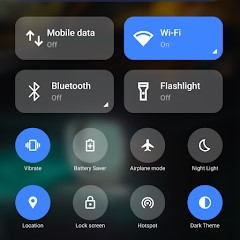
Set up the quick settings panel
The quick settings section provides options for background and icon colors. The brightness slider color can also be changed. This panel displays icons related to device information and allows users to add their own profile photo.
Tile icon shapes can be selected from several styles, such as circles, squares, droplets, and gradients. In the Pro feature, the quick settings grid layout can be changed, including the number of columns and rows.
MOD Information
Pro Unlocked means that the Pro features are unlocked.
Other MOD details have not been listed in the source.
Power Shade APK Details
| App name | Power Shade |
|---|---|
| Download file version | 18.6.2 |
| Download file size | 16.8 MB |
| Developer | Zipoapps |
| Android requirements | 9 |
The app information and MOD details refer to APKMB. The download link leads to the APK file provided by APKMB.